
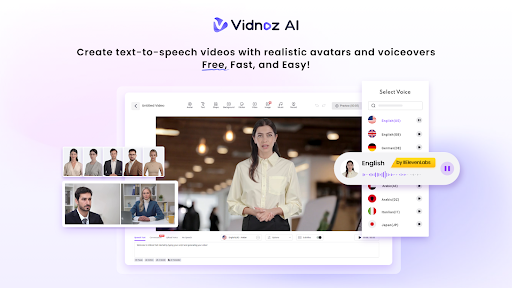
AI in Education: Use Cases, Challenges & Tools like Vidnoz AI
Classrooms do not resemble how they were a decade ago. Smart technology is the new center of learning. The AI is assisting students in studying and the teachers in their jobs. However, new technology is associated with new problems. Schools have to consider costs, training, and safety. But the right tools can solve many of these issues. Vidnoz AI is one such platform that helps educators make great video content without spending a fortune or learning complex software.
This guide breaks down how schools are using smart technology, what problems they face, and how platforms like Vidnoz AI fit into the picture.
Use Cases of AI in Education
Smart technology is not some far-off dream for schools. It is already part of daily learning in many places around the world. Here are some ways it shows up in classrooms today:
- Personalized Learning Experiences: The students do not learn in the same way. AI can be used to develop personalized learning plans depending on strengths and weaknesses.
- Virtual Tutors and Assistants: Chatbots are becoming common in schools and respond to students’ questions 24/7. Still have homework at midnight? These virtual helpers explain tricky topics in plain language.
- Video-Based Learning Content: Video lessons are everywhere now. They work great for online classes and homework help. Platforms like Vidnoz AI let teachers make professional videos without cameras or editing skills.
Challenges of AI in Education
The Smart technology sounds good, but there are actual issues schools face when using it.
- Privacy Worries: Schools need to keep student information safe against hackers.
- Unequal Access: Not all students can afford a laptop or a quick internet connection at home.
- Teacher Training: A good number of teachers should be well-trained in using these tools.
- Screen Time Concerns: Adding more technology may not suit young minds already glued to screens.
Vidnoz AI: A Powerful Tool for Educational Video Creation
To create a good educational video it used to take the hiring of crew, equipment and days of editing. Those days are over. Vidnoz AI is a free platform that lets anyone create professional videos in just minutes.
The platform holds ISO/IEC 27001:2022 certification for Information Security Management. This means your work and data stay protected under strict international standards.
Key Features of Vidnoz AI
Vidnoz AI packs everything educators need into one simple platform. Here is what makes it stand out.
-
1900+ Lifelike Avatars
The platform offers more than 1900 realistic avatars from various industries and roles. There is always an existing or customizable avatar to match the context. Want to appear in the video yourself? Create a digital twin. Need something more animated? Try an expressive avatar.
-
2000+ Lip Sync AI Voices
Finding the right voice matters. The Vidnoz AI can offer you more than 2000 natural voices of more than 140 languages. These are offered by trusted providers such as ElevenLabs, Microsoft and Google. Do you have students who speak English, Hindi or Portuguese? A voice that fits is only a few clicks away.
-
2800+ Pre-Designed Video Templates
Starting from scratch takes time. That is why the platform includes over 2800 ready-made templates. You will discover training video designs, explainers, tutorials, and social media content designs. Choose one, and write your stuff and most of the work is already done.
-
Free Daily Use
Budget is always a concern for schools. Vidnoz AI gives every user 2 minutes of free video creation each day. No credit card required. Teachers can test the platform and create short lessons without spending anything.
How to Use Vidnoz AI
Getting started takes only a few minutes. Here is a quick walkthrough.
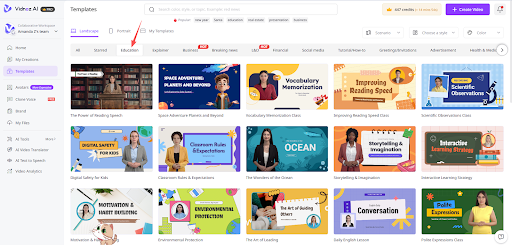
Step 1: Choose a Template and Avatar
Open the template library and browse the options. Select one that suits your lesson or topic. Thereafter, select an avatar that fits your tone. Professional, friendly or fun, it is up to you.
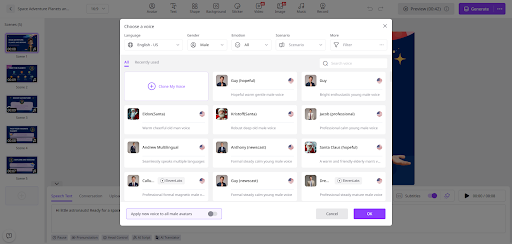
Step 2: Create AI Voiceover
Type your script into the text box. Then explore the voice library and listen to samples. With thousands of options, finding the right one is easy.
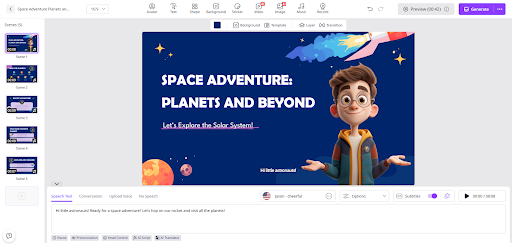
Step 3: Add Custom Touch
Make the video your own. Drop in your school logo. Change the background colors. Insert subtitles or background music. Such minor facts have a huge impact on the way the content is delivered to the students.
Step 4: Generate AI Video and Share
Hit the generate button and give it a moment. Your finished video will be ready to download or share directly with your class. The whole process takes just minutes.
Why Educators Prefer Vidnoz AI
Video content has become a must-have for teaching and training. Vidnoz AI makes it simple for anyone to produce quality work without a big budget or technical background.
- Cuts costs by removing the need for cameras and production teams
- Works for beginners who have never edited a video before
- Supports over 140 languages to reach students everywhere
- Gives full control over avatars, voices, templates, and design
- Meets strict security standards to keep your content safe
Check out Vidnoz AI and see how simple video creation can be. Start making content that grabs attention and helps students learn.
Final Thoughts
Education is evolving with smart technology. Tools like Vidnoz AI play a big role in this change. The question is not whether to adapt, but how quickly schools can catch up.
Vidnoz AI brings professional video creation within reach for everyone.. Teachers can now create professional video lessons in minutes without cameras or editing skills.
The best part? Vidnoz AI offers free daily use, so educators can try it without spending money.